
Turning an old photo into a new photo
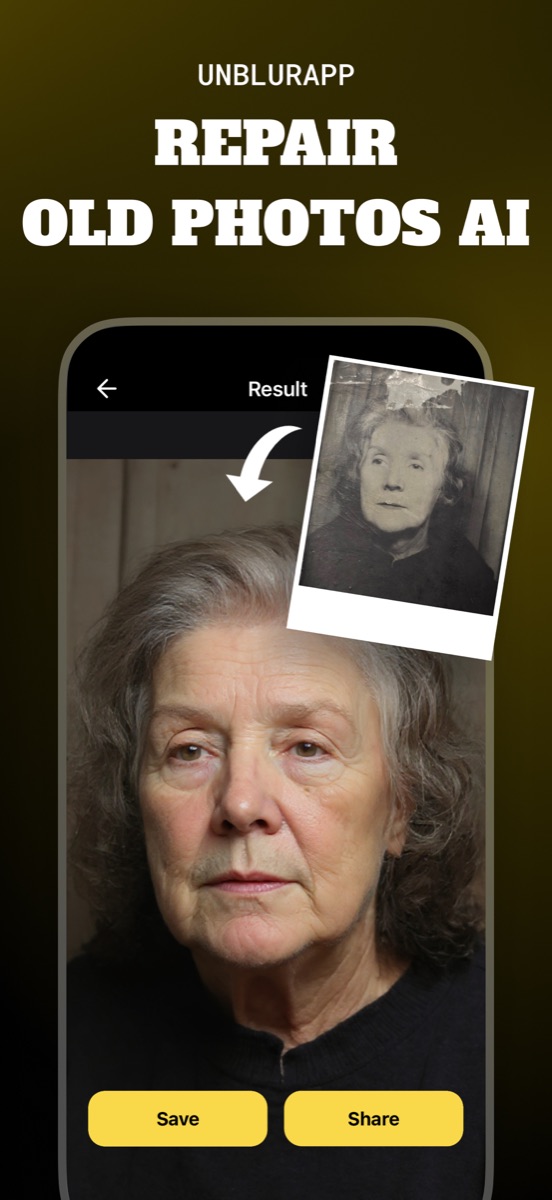
To turn an old photo into a new one, fix the four things age did to it: faded contrast, lost sharpness, physical damage and low resolution. Run the scan through Repair in UnblurApp and all four are handled in a single pass, with the result exported at up to 4x the size you fed it.
What actually makes a photo look old
Age is not one problem. A print from 1971 looks its age for four separate reasons, and each one has a different fix.
Contrast has flattened, because dyes fade unevenly and the blacks drift toward grey. Detail has gone soft, from a lens that was never sharp and a print made two generations away from the negative. The paper has picked up physical damage: creases where it sat in a wallet, a bent corner, dust ground into the surface. And the resolution is low by any modern measure, so it looks small and mushy the moment it lands on a phone screen.
Knowing which of the four is doing the most damage tells you where to spend your effort. A photo that is merely faded needs a completely different pass from one that is cracked down the middle.
Old photo to new photo in three taps
- Capture the print
Lay it flat in soft daylight with no flash and photograph it straight on, filling the frame.
- Run Repair
Open the capture in UnblurApp and pick Repair. It handles fading, softness, damage and resolution together.
- Check the faces before saving
Drag the comparison slider and look at the eyes. That is where an over-eager restoration shows itself first.
If the photo is black and white and you want colour as well, do Repair first and Colorize second. Colour applied over an unrepaired crack tends to draw attention to the crack.
The line between restored and rewritten
There is a point where a restored photo stops looking like an old photo that was cleaned up and starts looking like a new photo of a person in period clothes. Most people can feel that line even when they cannot name it.
Film grain is part of it. So is the slightly warm cast of a print that has aged, the shallow depth of field of a cheap lens, the way skin renders on 1970s emulsion. Strip all of that out in pursuit of clarity and you get an image that reads as generated, because everything that dated it has been removed.
The version people react to is usually the one where the damage is gone and the character is not.
How much of this is real
Worth being clear about, since the word "restore" implies recovery. What the model does is closer to informed reconstruction: it produces detail consistent with what it can see, based on millions of photographs it has studied. Where your print still holds information, that reconstruction is accurate. Where the print has lost it, the model supplies something plausible.
For a family album, this is exactly the right trade. For anything that functions as a record, keep the original scan alongside the restored version and be clear with people about which is which.
Getting them onto a wall
The 4x upscale is what makes printing possible. A 1970s snapshot scanned on a phone gives you maybe 1200 pixels across, which prints acceptably at postcard size and falls apart at anything larger. Four times that, and an A4 print looks sharp at arm's length.
Two practical notes. Print a small test first, because screens are backlit and paper is not, so a restoration that looked bright on your phone can print flat. And if you are framing behind glass, matte paper hides small reconstruction artefacts that gloss will happily magnify.
Questions people also ask
Can you make an old photo look new without a scanner?
Yes. A phone photo taken flat in soft daylight gives the model plenty to work with. A scanner helps on very small or highly detailed prints, but it is not what separates a good result from a bad one.
Should I colorize an old photo as well as restore it?
That depends on the photo. Repair first either way. Colour suits family portraits and group shots; formal studio work from the 1930s and 40s often looks stronger left in black and white.
Related guides
How to restore old photos
Restore old photos without a scanner or Photoshop. How to capture prints properly, what AI restoration fixes, and how to make old photos look new.
Read the guide →
How to colorize black and white photos
Colorize an old photo in one tap. How AI picks skin tones and fabric colours, what it gets wrong, and why you should always keep the black and white original.
Read the guide →
How AI photo restoration works
How AI photo restoration rebuilds faded, blurry and damaged pictures, why the results are plausible rather than recovered, and when to trust them.
Read the guide →