
Old blur photo to clear photo
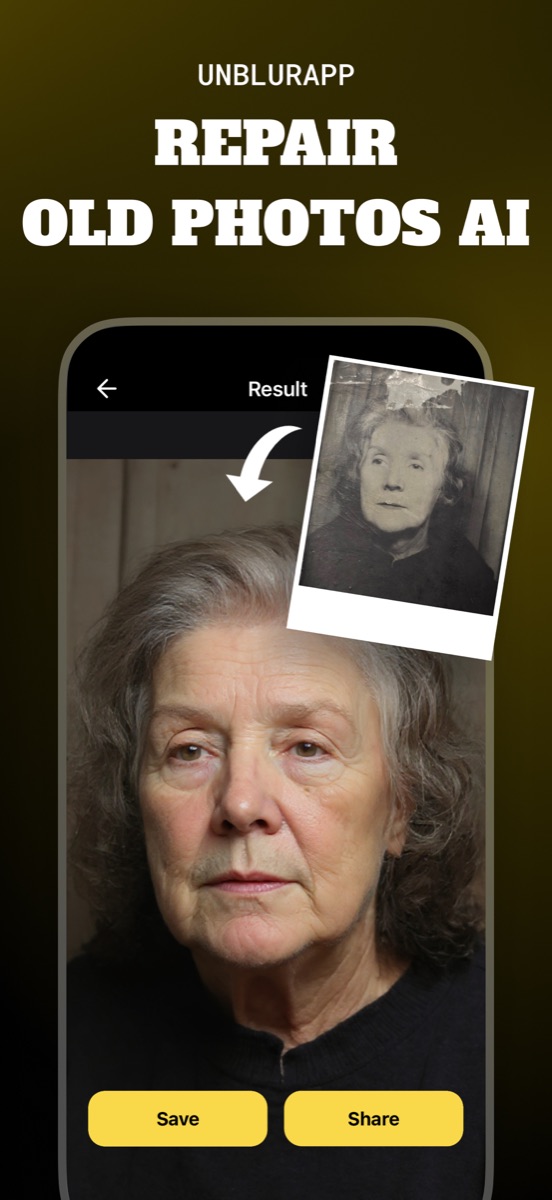
An old photo is usually blurry for a different reason than a modern one, and that changes the fix. Modern blur comes from movement or a missed focus point. Old prints are soft because of the camera that took them, the negative they came from, or the copy of a copy they ended up as. Repair in UnblurApp treats that softness together with the fading and damage that came with it, then exports at up to 4x.
Old blur is not the same as new blur
This distinction decides which tool you reach for, and most people skip it.
A blurry photo from your phone lost its sharpness in a fraction of a second: your hand moved, or the lens focused behind your subject. The detail exists in the file, spread across neighbouring pixels, and a deblur pass gathers it back.
An old print was often never sharp. A 1960s consumer camera had a modest lens and no autofocus. The print was made from a negative that had already lost a generation of detail, and it may itself be a photograph of a photograph. On top of that, decades of fading have flattened the contrast that made it look sharper than it was.
So the work is different: instead of undoing a moment of movement, you are rebuilding detail that was thin to begin with and has degraded since.
Turning an old blur photo into a clear photo
- Capture the print properly
Flat surface, soft daylight, no flash, phone parallel to the paper. A poor capture adds new blur on top of the old.
- Run Repair, not just Enhance
Repair handles softness, faded contrast, damage and resolution together, which is the combination an old print usually presents.
- Run Restore Faces if people are the point
A general pass leaves faces soft. The face model rebuilds eyes and hair structure specifically.
- Compare, then save
Drag the slider. If the result looks like a different person or a modern photo, dial back to the Repair-only version.
Running Enhance alone on an old print is the most common mistake. It sharpens what is there without addressing the flat contrast, and flat contrast is a large part of why the photo reads as blurry in the first place.
Contrast does half the work of sharpness
Two photographs with identical detail look very different if one has true blacks and the other tops out at grey. Your eye reads edge contrast as sharpness, so a faded print looks blurrier than it technically is.
This is good news. Recovering the tonal range of a faded print often produces a bigger apparent jump in clarity than the detail reconstruction does, and tonal recovery is the more reliable of the two operations.
Which old blurry photos come out clear
Prints that are soft but intact do well, and so do faded ones, since both problems respond to the same pass. Small prints benefit twice, because the upscale adds size along with the clarity.
Three cases stay disappointing. A photograph of a photograph has lost detail twice and has little left to rebuild. A print made from a badly out-of-focus negative never held the information. And a photo already blurry that then got scanned carelessly has two layers of softness, one of which you can fix by recapturing it properly.
Do not chase maximum sharpness
There is a version of every restoration that is technically sharper and looks worse. Skin turns to plastic, grain disappears completely, and the photograph stops looking like something taken in 1968.
The result people respond to keeps some texture. If the app gives you a choice, pick the one where you can still tell it is an old photograph, just a clear one.
Questions people also ask
How do I convert an old blur photo to a clear photo for free?
UnblurApp is free to download and lets you run a print through Repair. Check the export size on whatever tool you use, since free tiers commonly hand back a smaller file than you uploaded.
Why does my old photo still look soft after enhancing it?
You probably ran the general enhance rather than Repair. Old prints usually need contrast recovery and upscaling alongside sharpening, and a deblur pass alone addresses only one of the three.
Related guides
How to restore old photos
Restore old photos without a scanner or Photoshop. How to capture prints properly, what AI restoration fixes, and how to make old photos look new.
Read the guide →
How to make a blurred picture clear
Make a blurred picture clear on your phone. The three kinds of blur, which ones clear up, and why sharpening a soft photo usually makes it look worse.
Read the guide →
How to photograph old photos with your phone
Capture old prints properly with a phone camera. Light, angle, glass, glare and focus, and why the capture puts a ceiling on every restoration that follows.
Read the guide →