
How to unblur a photo on Android
Check what your phone already does first. Samsung Gallery has Remaster picture, and Google Photos has Unblur on Pixel and for Google One members. Both are free and take one tap. When they fall short, which happens on old scans and heavily compressed images, a dedicated AI restorer picks up where they stop.
Try the tools already on your phone
Android fragments here, so what you have depends on who made the handset.
Samsung Galaxy: open the photo in Gallery, tap the pencil to edit, then look for Remaster picture in the menu. On recent One UI versions it sits behind the three-dot menu in the viewer. It sharpens, lifts contrast and reduces noise in one pass.
Google Pixel: Google Photos includes Unblur in the editor under Tools. It was a Pixel exclusive at launch and later reached Google One subscribers on other Android phones, so check whether the button is there before assuming it is not.
Everyone else: most manufacturer galleries offer only manual sharpen and contrast sliders, which harden a blurry photo without clearing it.
Where the built-in tools stop
Remaster and Unblur are tuned for recent phone photographs: a shot from last week that came out slightly soft. That is most people, most of the time, and when it works you have no reason to install anything.
Three cases defeat them fairly reliably. Scans and phone captures of old prints, where the problem is fading and physical damage as much as softness. Images flattened by messaging apps, where the detail is gone rather than smeared. And faces at small scale, such as a group photo where each person occupies forty pixels, since neither tool runs a portrait-specific model.
Using a dedicated restorer
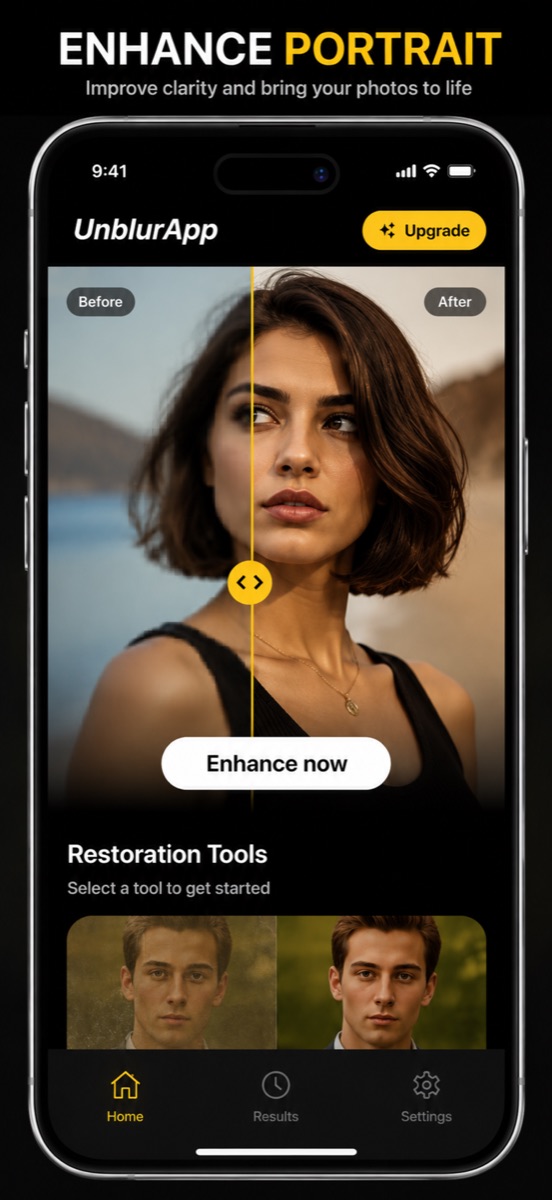
- Install and open the app
The Play listing is Enhance Photo Quality, Unblur. It is free to download.
- Pick the photo
Choose from your gallery. Old scans, screenshots and camera shots all work.
- Choose the right tool
Enhance for ordinary blur, Repair for old prints, Restore Faces when people are the subject.
- Compare and save
Drag the before and after slider, then save. The original stays in your gallery.
The main difference from a gallery feature is that the work is split by problem. A single Remaster button applies one treatment to every kind of damage, which is why it does well on a soft selfie and poorly on a cracked 1962 print.
Android gallery quirks worth knowing
Saved images from chat apps are already compressed. WhatsApp and Messenger write a reduced copy to your gallery, so the file you enhance is not the file the sender took. Ask for the original through email or a file transfer and you will get a better result than any amount of processing gives you.
Check where enhanced copies land. Some apps write to their own folder rather than to Camera, which is why people occasionally think a save failed. Look in Gallery under albums before repeating the job.
Storage permissions on Android 13 and later are per-media rather than blanket. If an app cannot see your photos, grant access to the specific images instead of hunting through settings for a global switch that no longer exists.
Which blurry photos are worth the attempt
The test is the same on any platform: if you can tell what the subject is, there is enough structure to rebuild. If the frame is a featureless smear, the information was never recorded and anything produced is invented.
Camera shake and focus misses recover well. Photos taken through glass or at speed recover partly. Heavily forwarded images need upscaling rather than deblurring, because their detail was discarded by a compressor rather than displaced by a lens.
Questions people also ask
Does Samsung have a built-in unblur feature?
Yes. Samsung Gallery includes Remaster picture, reached from the photo viewer menu or the edit screen depending on your One UI version. It sharpens, lifts contrast and reduces noise in a single tap.
Is Google Photos Unblur available on all Android phones?
No. It launched as a Pixel feature and later extended to Google One subscribers on other Android devices. Open a photo in the Photos editor and look under Tools to see whether you have it.
Related guides

How to unblur a photo on your iPhone
Unblur a photo in three taps. What causes blur, which blurry pictures can actually be saved, and how to remove blur from a photo on iPhone.
Read the guide →
Choosing the best app to unblur photos
Choosing an app to unblur pictures? Here are the five things that separate a useful photo unblur app from a watermark factory, and how UnblurApp compares.
Read the guide →
How to make a blurred picture clear
Make a blurred picture clear on your phone. The three kinds of blur, which ones clear up, and why sharpening a soft photo usually makes it look worse.
Read the guide →